Delivery Schedules and Availability Schedules
Delivery schedules are linked to shops and customers and can be used to calculate the first and possible delivery dates, based on multiple business rules. Availability schedules are linked to products. They are available for shops where Grouping the basket is set to by delivery date and are used to extend the delivery schedule of the shop or party with additional rules for products that require an additional process. The working days of the delivery schedule will be taken into account and above that, the working days of the availability schedule will be taken.
When no delivery schedules are defined, the standard behavior of the webshop is:
- No delivery dates before today.
- Saturday and Sunday are non-working days.
Delivery schedules and availability schedules come into action only when linked to shops, customers and/or products. This is described in a separate Recipe.
To work with delivery schedules, in the CloudSuite App go to Order Management > Configuration > Delivery Schedule Configuration > Delivery Schedule. To work with availability schedules, in the CloudSuite App go to Order Management > Configuration > Delivery Schedule Configuration > Availability Schedule.
An overview appears, listing all delivery or availability schedules, respectively, that have already been defined. Double-click an existing schedule to open its details or click New to create a new one.
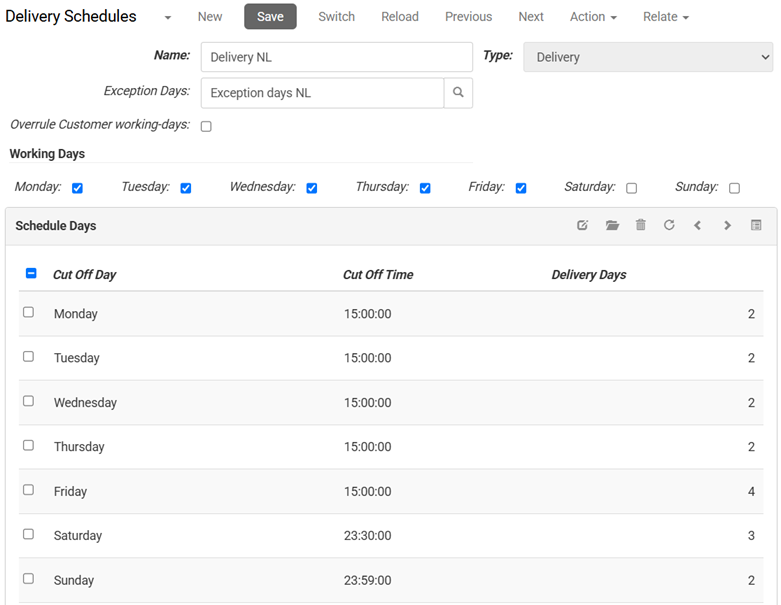
- The Name of the schedule is for internal reference and will not be shown to the customer.
- The Type is set automatically, depending on which menu option you have selected:
- Delivery indicates a delivery schedule, that can be linked to shops and parties.
- Availability indicates an availability schedule, that can be linked to products.
- Exception Days are days that are non-working days, even though they are included in the schedule. They are defined separately.
- If Overrule Customer working-days is checked, the working days of the customer are not taken into account (for example, in case of pickup delivery).
- If for an availability schedule Check Stock available is checked, stock availability is taken into account. This field is not present for delivery schedules.
- Under Working days, check all the weekdays that count as working days. Delivery can be on these days.
- Under Schedule Days, specify for each weekday the Cut Off Day and Cut Off Time that are used for calculating the delivery time. In the example below, and order placed on a Monday before 15:00 can be delivered in 2 day on the following Wednesday; placing an order after 15:00 adds another day, resulting in delivery on Thursday.