Dashboard
The Dashboard presents valuable information on how customers are using your site, and tells you about new features of the CloudSuite platform.
To view your Dashboard, simply click on the Dashboard option at the very top of the Admin menu.

News
At the top of the Dashboard, directly below today's date, you will find a few new items concerning the CloudSuite platform. These can range from information on features that CloudSuite has released, to upcoming features that CloudSuite is designing and would like your feedback on.

Statistics
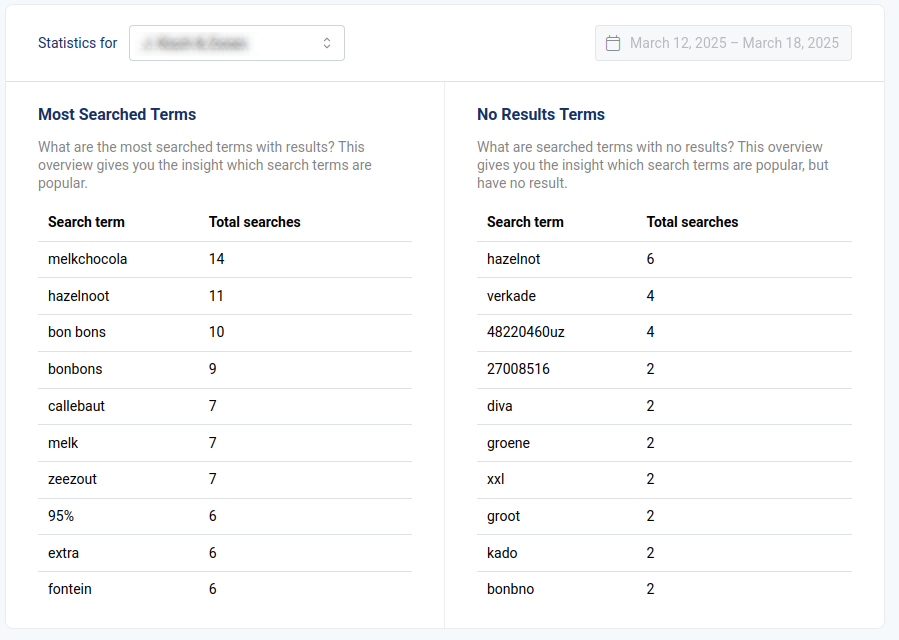
Underneath the news, two overviews list keywords that your customers have searched for.
- If you have multiple shops, next to Statistics for select the shop for which you want to display keyword statistics.
- The date field to the right allows you to select a date range for which statistics must be shown.
- Most Searched Terms is a list of the 10 keywords that people have most frequently entered into the Search bar on your webshop. Keywords entered without search results are not included in this list.
- No Results Terms is a list of the 10 keywords that people have most frequently searched for, but that have yielded no results. If a certain term appears here with a high number under Total searches, it may be interesting to create a search keyword redirect or define synonyms.
Note that neither list is exhaustive: only the top 10 keywords for each list are displayed.