Finding Shop Details
There are some shop details that you need to find regularly. These are listed in this article.
Domains
To find a shop's domains, open the shop details and go to the tab Domains. You will see all available domains.
ID
Checking the ID of a shop is useful for relating to sales for use in the front-end.
To find a shop's ID, open the shop details and from the menu next to the Shops label, select View Logs.
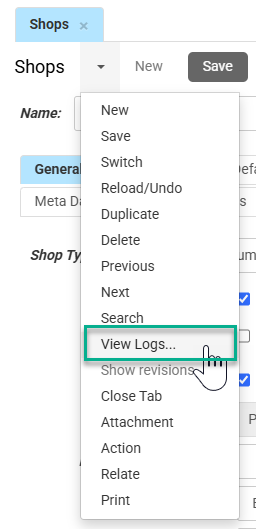
A pop-up opens up where the ID of the shop is stated on the first line.
Consumer Price Mode
With Consumer Price Mode, you can switch to B2C prices including VAT in the webshop. This switch is typically located in the shop's header, ensuring easy access for users at all times.
To set Consumer Price Mode, open the shop details and go to the tab Prices.
Check the box Consumer Price Mode. This will open a new field, where you select the default party with the consumer price lists. Then Save your changes.
PLP Sorting Choices
To set the sorting options in the PLP, open the shop details and go to the tab Search and Navigation.
Scroll down to the section labeled Default Sort Modes and specify the allowed sorting options in the field Sorting choices. Then Save your changes.
You can hover your mouse over the field to see a pop-up listing the possible options.